


What is a Title Tag?
A title tag is an HTML element that tells search engines and users what a webpage is about. It appears as the clickable SEO title in search results, in browser tabs, and sometimes when a page is shared or saved.
Title tags are one of the most important on-page SEO elements because they help search engines understand your page’s topic and help users decide whether your result is worth clicking.
Where do Title Tags Appear?
Title tags can appear in several important places, which is why they need to be clear, accurate, and useful to both search engines and users.
The most common place you’ll see a title tag is in the search results. When your page appears on Google or another search engine, the title tag is often used as the clickable headline for your result.
For example, if someone searches for “SEO audit tool,” the page’s title tag may appear as the blue clickable link in the search results.
Title tags can also appear in:
Browser Tabs
The title tag is usually shown at the top of the browser tab, helping users identify which page they have open.

Bookmarks
When someone saves your page as a bookmark, the title tag is often used as the default bookmark name.
Social Shares and Link Previews
In some cases, platforms may use the title tag when generating a preview for a shared link, although this can also depend on social metadata such as Open Graph tags.
Search Engine Result Pages
Search engines may use the title tag to create the visible search result title, also known as the title link.

Because title tags appear in these highly visible places, they should quickly communicate what the page is about.
A vague title like “Home” or “Services” gives users very little reason to click, while a descriptive title such as “SEO Audit Tool for Website Analysis” is much clearer and more useful.
Title Tag vs Meta Title vs SEO Title
These terms are often used to describe the same thing, but there are small differences worth knowing.
A title tag is the official HTML element that sits in the <head> section of a webpage. This is the actual code search engines can read to understand the title of the page.

Here’s another example from our own homepage of what it looks like in HTML:
<title>Analyze Websites With Free SEO Audit & Reporting Tool - SEOptimer</title>
A meta title is a common term used by marketers and SEO tools, but technically, it is not a true “meta” tag. When people say “meta title,” they usually mean the page’s title tag.
An SEO title is the title you write and optimize for search engines and users. In most cases, this is also the title tag.
The goal of an SEO title is to clearly describe the page, include the main keyword where relevant, and encourage people to click your result.
Title Tag vs H1 Tag
A title tag and an H1 tag both help describe what a page is about, but they appear in different places.
The title tag is the page title that search engines often use as the clickable headline in search results. It can also appear in browser tabs and bookmarks.
The H1 tag is the main heading users see when they land on the page itself. It is usually the large heading at the top of the content.

Your title tag and H1 tag can be the same, but they do not have to be identical.
| Element | Example |
|---|---|
| Title tag | Title Tag: SEO Best Practices, Examples & Templates |
| H1 tag | What is a Title Tag? |
In this example, the title tag is written to perform well in search results, while the H1 is shorter and more natural for readers on the page.
The important thing is that both should describe the same topic.
If your title tag says one thing and your H1 says something completely different, it can confuse users and make the page feel less relevant.
Why are Title Tags Important for SEO
1. Title Tags Help Search Engines Understand the Page Topic
A title tag gives search engines a clear signal about what your page is about.
If your page targets the keyword “plumbing services,” then using that phrase naturally in the title helps reinforce the topic of the page.
For example:
<title>Professional Plumbing Services in Austin | ABC Plumbing</title>
This title clearly tells search engines that the page is about plumbing services in Austin, while also giving users useful context before they click. It includes the main service, the location, and the brand name in a natural way.
2. Title Tags can Improve Click-Through Rate
Your title tag is often the first thing someone sees in the search results.
A clear, relevant, and compelling SEO title can help your result stand out and earn more clicks.
This matters because organic search results do not all get the same amount of attention.
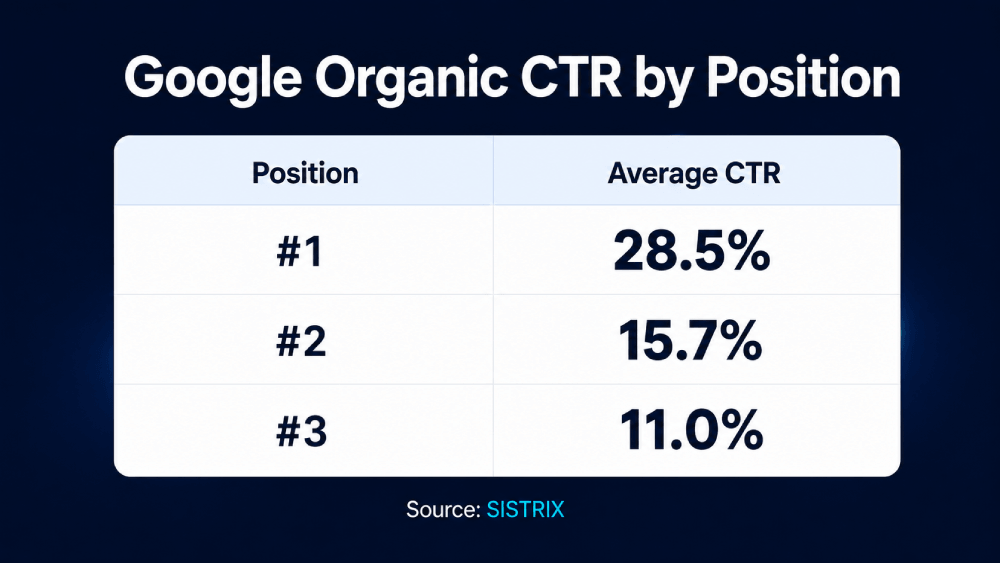
SISTRIX found that the average click-through rate for the first organic Google result was 28.5%, compared with 15.7% for the second result and 11% for the third.
So, even if your page ranks well, your title still needs to give people a reason to choose your result over the others.
3. Title Tags Help Users Understand What They will Get Before they Click
A good title tag sets the right expectation. It tells users what the page covers and whether it matches what they are looking for.
For example, a vague title like this is not very helpful:
<title>Home</title>
A clearer title gives users much more context:
<title>Plumbing Repairs 24/7- Free Estimates</title>
The second example explains what the page offers, includes relevant keywords, and makes the result more useful to searchers.
4. Title Tags can Affect How Your Page Appears in Search Results
Google does not always show your title tag exactly as written.
It may rewrite the title link if the title is too long, too vague, stuffed with keywords, duplicated across pages, or does not accurately describe the content.
Google says it may use other sources to create title links, including the main visual title, heading elements, prominent text on the page, anchor text, and structured data.
That means your title tag should closely match the actual content of the page. The more accurate and useful your title is, the better chance Google has of using it as intended.
6. Title Tags Support Better On-Page SEO
Title tags work together with other on-page SEO elements, including the H1 tag, meta description, URL, headings, and body content.
When all of these elements point to the same topic, your page sends a clearer signal to both search engines and users.
For example, if your title tag says “Family Dentist in Chicago”, then your H1, introduction, meta description, and page content should also focus on family dental services in Chicago.
In short, a good title tag helps your page communicate its topic, attract the right clicks, and create a better experience from the search result to the actual page.
How Long Should a Title Tag Be?
A good title tag should usually be around 50 to 60 characters long.
That said, there is no exact title tag length that works perfectly every time.
Google does not have a fixed character limit for the <title> element. Instead, title links in search results are shortened when needed to fit the available space, which can change depending on the device and screen size.
A better way to think about title tag length is:
Keep your title tag long enough to describe the page clearly, but short enough that the most important words are visible in search results.
In many cases, this means keeping your SEO title within 50 to 60 characters, or roughly 550 pixels.
How to Write an SEO-Friendly Title Tag
Here are some best practices to follow when writing better title tags.
1. Keep Your Title Tag Clear and Concise
Your title tag should be long enough to explain what the page is about, but short enough to display properly in search results.
As a general guideline, aim for around 50 to 60 characters. This is not a strict rule, but it helps reduce the chances of your title being cut off in Google’s search results.
For example, this title is clear and concise:
<title>Men’s Running Shoes | Lightweight Trainers</title>
This one is too long and likely to be truncated:
<title>Shop the Best Men’s Running Shoes, Lightweight Trainers, Gym Sneakers, and Athletic Footwear Online</title>
A good title tag gets to the point quickly. Avoid unnecessary words that do not add value, especially if they push the most important part of the title further back.
For example, instead of:
<title>Welcome to Our Website Home Page</title>
Use something more descriptive:
<title>Free SEO Audit Tool | SEOptimer</title>
2. Include the Target Keyword Naturally
Your title tag should usually include the page’s main keyword. This helps search engines understand the topic of the page and helps users see that your result matches what they searched for.
Where possible, place the target keyword near the beginning of the title.
For example:
<title>Project Management Software for Remote Teams</title>
This works well because the main keyword, title tag, appears right at the start.
But avoid forcing the keyword into the title if it makes the title awkward. The goal is not just to include a keyword. The goal is to write a title that makes sense and encourages the right users to click.
Related Reading: 9 Popular Types of Keywords in SEO (and How to Use Each)
3. Match the Title Tag to the Search Intent
A good SEO title should match what the searcher wants to find.
For example, someone searching for “how to clean a coffee machine” is probably looking for a practical step-by-step guide.
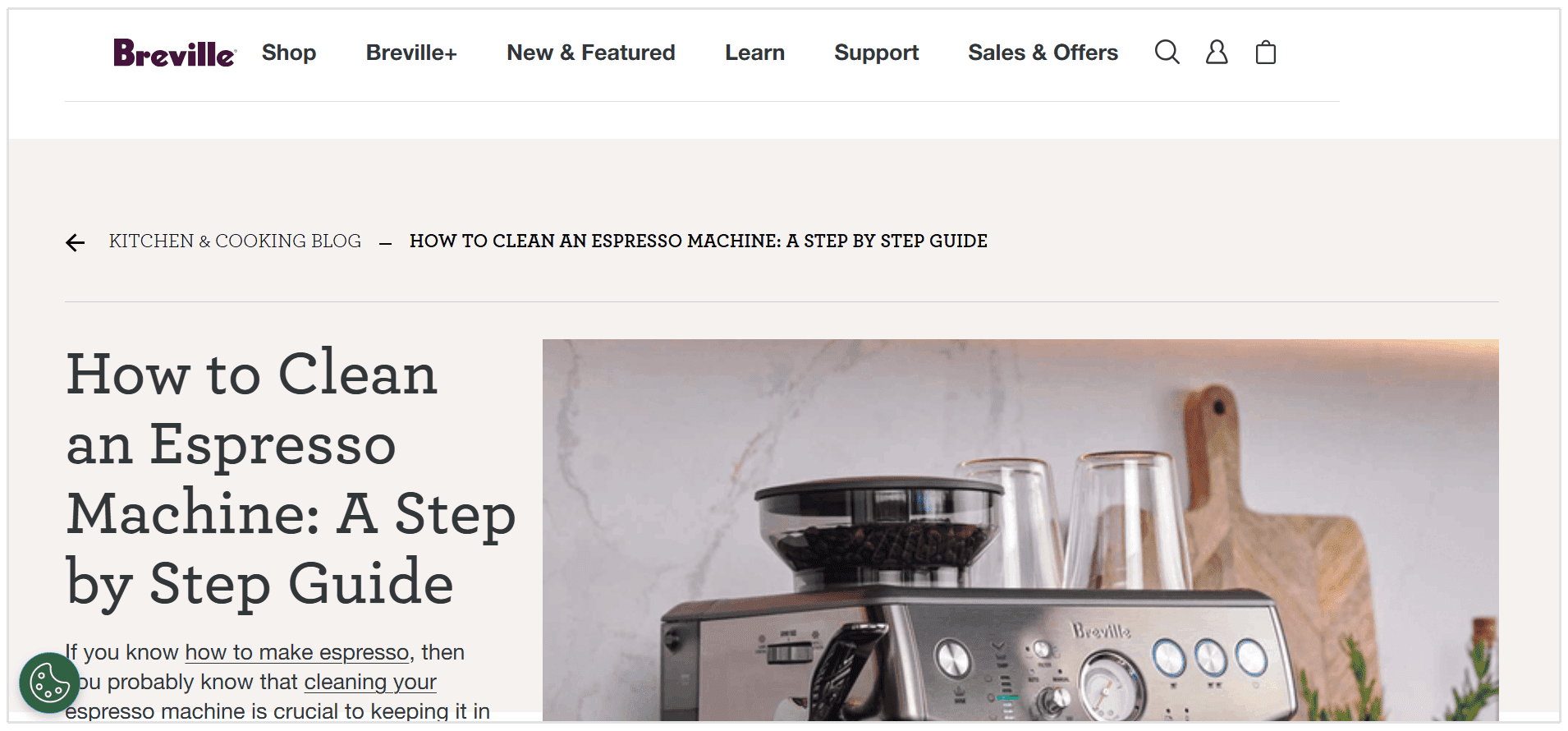
A good title for that intent might be like this one from Breville:
<title>How to Clean an Espresso Machine: A Step by Step Guide</title>
Someone searching for “best coffee machines for small offices” is likely comparing product options before making a purchase.
A better title for that intent might be:
<title>Best Coffee Machines for Small Offices</title>
Both titles are about coffee machines, but they match different search intents.
One is written for someone who wants instructions, while the other is written for someone who wants product recommendations.
4. Make Every Title Tag Unique
Each important page on your website should have its own unique title tag.
Duplicate title tags make it harder for search engines and users to understand how one page is different from another. They can also make your pages compete with each other in search results.
5. Avoid Keyword Stuffing
Keyword stuffing means forcing too many keywords into your title tag in an unnatural way.
For example:
<title>SEO Guide | SEO Tips | SEO Strategy | SEO Help</title>
This kind of title looks spammy and does not give users a clear reason to click.
A stronger version would be:
<title>SEO Guide: How to Improve Your Website Rankings</title>
This title is easier to read, still includes the main keyword, and gives users a better idea of what they will learn.
6. Avoid Vague Titles like “Home” or “Services”
Generic title tags do not tell users or search engines enough about the page.
For example:
<title>Home</title>
This does not explain what the business does or why someone should click.
The same applies to service pages. Instead of:
<title>Services</title>
Use a more specific title:
<title>Digital Marketing Services for Small Businesses</title>
Specific titles are more helpful, more searchable, and more likely to attract the right audience.
7. Use Your Brand Name when it Adds Value
Adding your brand name to the title tag can be useful, especially for your homepage, location pages, product pages, landing pages, and branded searches.
However, you do not need to force your brand name into every title if it makes the title too long or repetitive.
For blog posts, guides, and informational pages, the topic of the page should usually come first.
8. Make the Title Useful Enough to Click
A title tag should not only describe the page. It should also give users a reason to choose your result over another one.
You can make a title more click-worthy by adding a clear benefit, format, or differentiator.
Useful additions can include words like:
- Examples
- Templates
- Checklist
- Guide
- Best Practices
- Step-by-Step
- For Beginners
Just make sure the title accurately reflects the content on the page. A click-worthy title should still be honest.
9. Review How Your Title Appears in Search Results
After publishing or updating a page, check how your title appears in Google.
One simple way to do this is to search: site:yourdomain.com/page-url
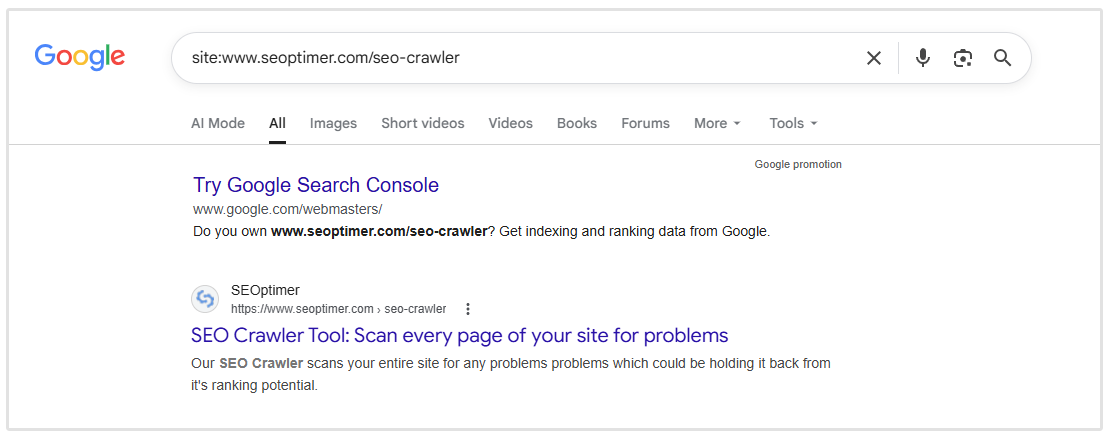
You can also use Google Search Console to see how the page performs.
Look at impressions, clicks, click-through rate, and average position. If a page gets a lot of impressions but very few clicks, the title tag may need to be improved.
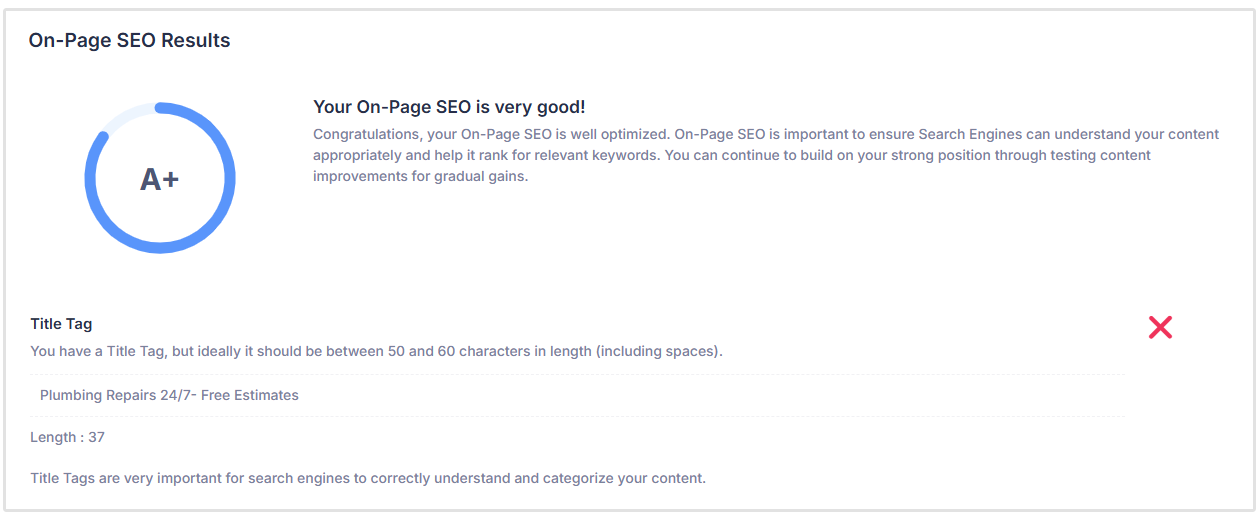
For larger websites, it is better to use an SEO audit tool like SEOptimer to find missing, duplicate, too long, or poorly optimized title tags across your site.
Common Title Tag Mistakes to Avoid
1. Writing Titles that are Too Similar Across Multiple Pages
Even if your title tags are technically unique, they can still be too similar.
For example:
<title>SEO Tips for Beginners | Example Blog</title>
<title>SEO Tips for Small Businesses | Example Blog</title>
<title>SEO Tips for Website Owners | Example Blog</title>
These titles are not identical, but they are close enough that users may struggle to understand how the pages are different.
A better approach is to make the unique value of each page clearer:
<title>SEO Tips for Beginners: 10 Basics to Start With</title>
<title>Small Business SEO Tips to Improve Local Visibility</title>
<title>Website SEO Tips to Fix Common Ranking Issues</title>
Each title now gives the page a clearer purpose.
2. Adding the Brand Name Before the Main Topic
Including your brand name can be useful, but it should not always come first.
For most informational pages and blog posts, users are searching for a topic, not your brand. If the brand name appears before the main keyword, it can push the most important part of the title too far back.
3. Making the Title Too Clever or Vague
Creative titles can work in some cases, but they should not make the topic harder to understand.
For example:
<title>The Secret Sauce Your Website Is Missing</title>
This might sound interesting, but it does not clearly explain what the page is about.
A better title would be:
<title>On-Page SEO Checklist: Improve Your Website Content</title>
This version is still useful, but much clearer for both users and search engines.
4. Forgetting to Update Old Titles
Title tags can become outdated over time, especially if they include dates, old product names, discontinued services, or outdated search intent.
For example:
<title>Best SEO Tools for 2021</title>
If the page has been updated, the title should be updated too:
<title>Best SEO Tools for 2026: Features, Pricing & Use Cases</title>
Outdated titles can make users think the content is no longer relevant, even if the page itself has been refreshed.
Related Reading: How to Refresh Old Content for SEO and the Age of AI
How to Measure Title Tag Performance
After writing or updating your title tags, it’s important to check whether they are actually helping people click through to your website.
One of the best ways to do this is by using Google Search Console. It shows how often your pages appear in search results, how many clicks they get, and how your search result titles may be performing over time.
To measure title tag performance, go to Google Search Console and open the Performance report.
You will need to add a Page filter to view metrics for an individual page:
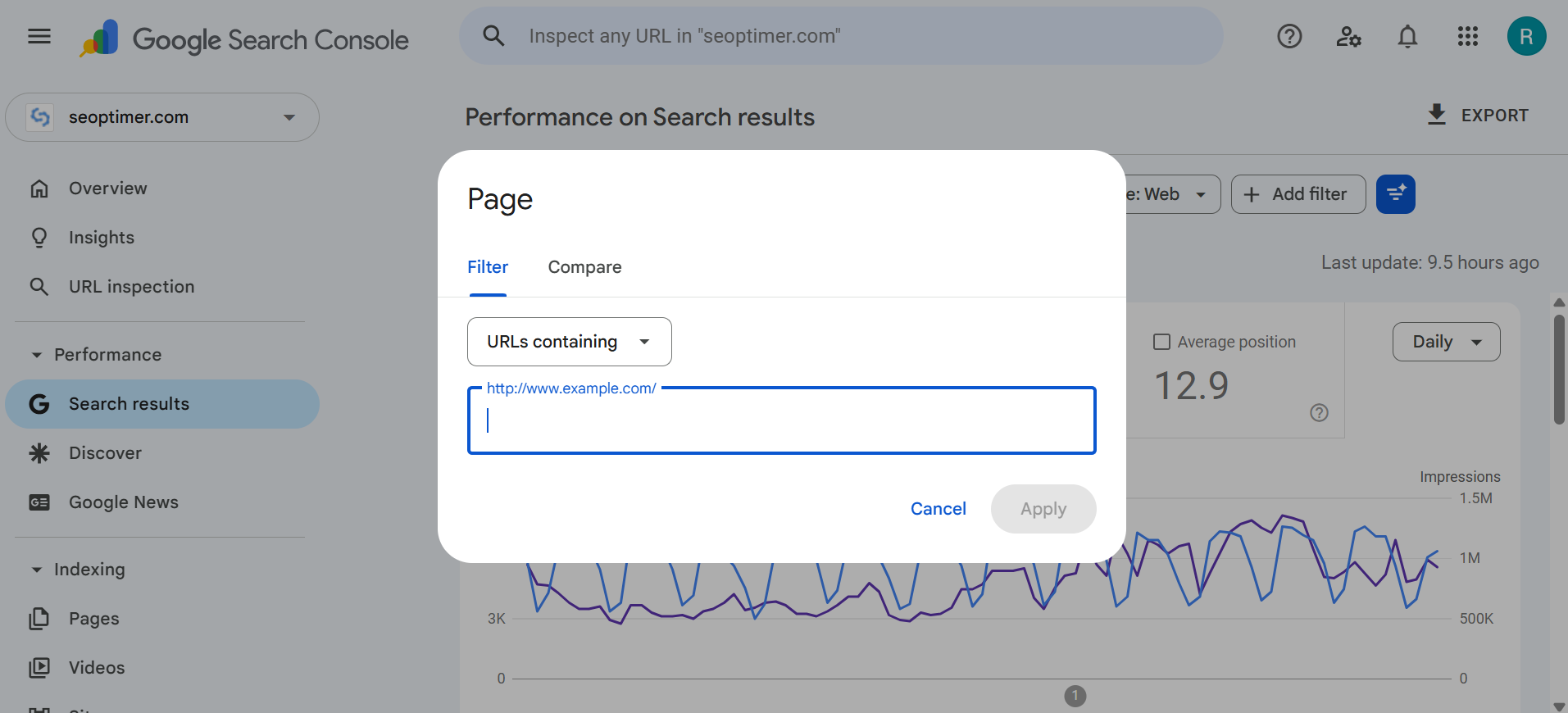
Then review these key metrics:
- Impressions: How many times your page appeared in Google search results
- Clicks: How many people clicked through to your page
- CTR: The percentage of impressions that turned into clicks
- Average position: The average ranking position of your page in search results
A good place to start is by looking for pages with high impressions but low clicks.
This usually means Google is showing your page to searchers, but not enough people are choosing to click on it. In some cases, the title tag may not be clear, compelling, or closely matched to the search intent.
You can also use Google Search Console to compare performance before and after updating a title tag. Choose a date range, such as the last 28 days, then compare it to the previous 28 days.
Look for changes in:
- Clicks
- CTR
- Impressions
- Average position
If clicks and CTR improve while impressions stay similar, your new title tag may be doing a better job of attracting searchers.
However, don’t judge performance too quickly.
Google may take time to recrawl the page and update the title shown in search results. It’s usually better to review performance over a few weeks rather than after only a day or two.
Also remember that title tags are not the only factor that affects clicks. Your ranking position, meta description, brand recognition, SERP features, and search intent can all influence whether someone clicks on your result.
In short, title tag performance should be measured by how well your search result turns impressions into clicks. If a page is visible in search results but not earning clicks, the title tag is one of the first things worth reviewing.
FAQs
1. What is a title tag in SEO?
A title tag is an HTML element that defines the title of a webpage. In SEO, it helps search engines understand what the page is about and is often used as the clickable headline in search results.
2. Is a title tag the same as a meta title?
Yes, in most SEO conversations, people use “title tag,” “meta title,” and “SEO title” to mean the same thing. Technically, though, a title tag is not a meta tag. It is its own HTML element found in the <head> section of a webpage.
3. What is the ideal title tag length?
A good title tag is usually around 50 to 60 characters long. There is no exact limit, but keeping your title within this range helps reduce the chance of it being cut off in search results.
4. Should every page have a unique title tag?
Yes. Every important page on your website should have a unique title tag that accurately describes that specific page. Duplicate or very similar title tags can make it harder for search engines and users to understand how your pages differ.
5. Should the title tag and H1 tag be the same?
They can be the same, but they do not have to be identical. The title tag is often written for search results, while the H1 is written for users already on the page. The important thing is that both should describe the same core topic.
6. Why is Google showing a different title than my title tag?
Google may rewrite your title tag if it thinks another title would better describe the page for a specific search. This can happen if your title is too long, too vague, stuffed with keywords, duplicated across pages, or does not match the actual page content.
Conclusion
Title tags may be small pieces of HTML, but they play an important role in how your pages appear in search results.
If you want to check your website for missing, duplicate, or poorly optimized title tags, run a free SEOptimer audit to see where your pages can be improved.